SpectraMagic™ CMS (ซอฟต์แวร์จับคู่สี)
ซอฟต์แวร์ Konica Minolta SpectraMagic™ CMS รวมการกำหนดสูตรสีและการปรับแก้สีในแต่ละล็อตการผลิตไว้ในแพลตฟอร์มเดียว โดยใช้ข้อมูลจากเครื่องวัดสีแบบสเปกโตรโฟโตมิเตอร์ของ Konica Minolta รุ่นที่รองรับ เพื่อคำนวณสูตรสีใหม่ ปรับแก้สีในการผลิต และค้นหาข้อมูลสูตรสีที่บันทึกไว้
ซอฟต์แวร์นี้รองรับการกำหนดสูตรสีทั้งแบบทึบแสงและโปร่งแสง โดยสามารถคำนวณสีและความทึบแสงได้พร้อมกัน พร้อมคำนึงถึงปัจจัยต่าง ๆ เช่น ความสามารถในการปกปิด ความหนาของวัสดุ และพื้นผิวรองรับ
SpectraMagic™ CMS ซอฟต์แวร์นี้ออกแบบมาสำหรับงานที่ต้องการความแม่นยำของสีสูง เช่น พลาสติก สี สารเคลือบ หมึก เครื่องสำอาง และวัสดุพิเศษต่าง ๆ โดยรองรับการพัฒนาสีใหม่ การกำหนดสูตรสีในห้องปฏิบัติการ การปรับแก้สีในแต่ละล็อตการผลิต การนำวัสดุที่เหลือมาใช้ประโยชน์ และการจัดการข้อมูลสูตรสี
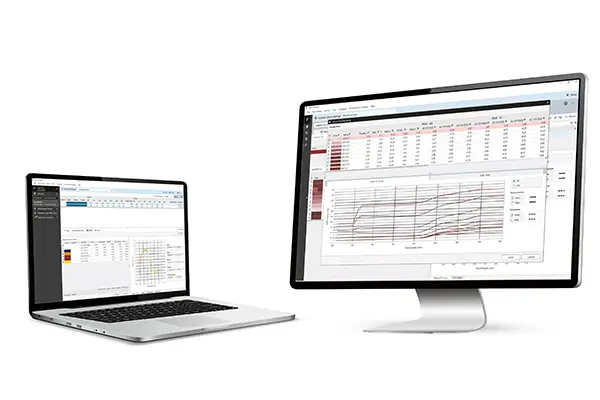
การจับคู่ที่ดีขึ้นสำหรับวัสดุที่ซับซ้อน
ฟังก์ชัน Delta E เฉพาะช่วยเพิ่มประสิทธิภาพการจับคู่สีสำหรับวัสดุที่ซับซ้อน โดย SpectraMagic™ CMS สามารถคำนวณสูตรสีโดยคำนึงถึงสีตามธรรมชาติของสารยึดเกาะ พร้อมรองรับการปรับเทียบสารยึดเกาะเพิ่มเติมให้เหมาะกับวัสดุและพื้นผิวที่แตกต่างกัน
ผู้ใช้สามารถเพิ่มข้อมูลตัวอย่างจากห้องปฏิบัติการและการผลิต เพื่อปรับปรุงความแม่นยำในการจับคู่สีครั้งต่อไป โดยระบบจะนำข้อมูลประสิทธิภาพของเม็ดสีที่วัดได้จริงมาประกอบการคำนวณร่วมกับข้อมูลทางทฤษฎี
ขั้นตอนการทำงานสำหรับการกำหนดสูตรสี
ผู้ใช้สามารถกำหนดให้ระบบไม่นำคู่สีที่มีข้อจำกัดมาผสมกัน นำวัสดุที่เหลือมาใช้ในการกำหนดสูตร และใช้แม่แบบเดิมซ้ำสำหรับงานกำหนดสูตรที่ทำเป็นประจำ พร้อมเปรียบเทียบตัวเลือกสูตรที่ระบบคำนวณได้ง่ายขึ้นด้วยฟังก์ชันการให้คะแนนและจัดเรียงสูตร
ขณะเดียวกัน ฟังก์ชันประวัติการกำหนดสูตรจะจัดเก็บข้อมูลงานที่ผ่านมาไว้สำหรับการอ้างอิง
SpectraMagic™CMS ยังรองรับการเชื่อมต่อฐานข้อมูลเพื่อจัดการข้อมูลสูตรการผลิต สามารถสร้างรายงานในรูปแบบ PDF และส่งออกข้อมูลสีในรูปแบบ CxF ได้
การจัดการสีแบบเชื่อมต่อ
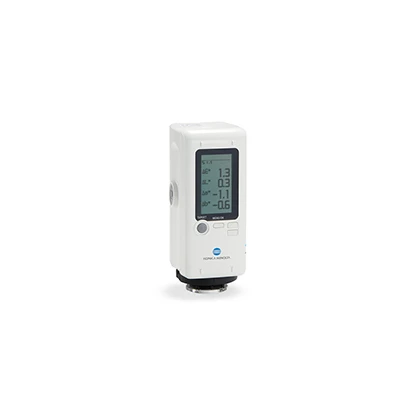
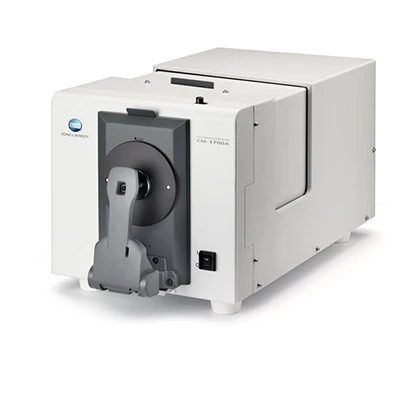
ซอฟต์แวร์นี้เชื่อมต่อกับเครื่องวัดสีแบบสเปกโตรโฟโตมิเตอร์ของ Konica Minolta รุ่นพกพาและตั้งโต๊ะที่รองรับ เพื่อรับข้อมูลการวัดได้โดยตรง อีกทั้งยังใช้งานร่วมกับซอฟต์แวร์ควบคุมคุณภาพ SpectraMagic™ NX2 เพื่อเชื่อมโยงขั้นตอนการทำงานตั้งแต่การวัด การกำหนดสูตรสี การประเมินผล ไปจนถึงการจัดทำรายงาน
| | SpectraMagic™ CMS เวอร์ชันเต็ม | SpectraMagic™ CMS มาตรฐาน |
| Formulation of opaque and translucent colors | ● | ● |
| Correction | ● | ● |
| Material leftover management | ● | ● |
| History-based data utilization | ● | ● |
| Colorant definition | ● | – |
| Database function | ● | ● |
| User Management | ● | – |
* มีตัวเลือกมาตรฐานพร้อมคุณสมบัติหลักสำหรับการใช้งานกับหลายลูกค้า
** SpectraMagic™ CMS นำเสนอความสามารถในการกำหนดสูตรและคำนวณสีอย่างครอบคลุม ซึ่งออกแบบมาเพื่อการจับคู่สีที่แม่นยำและมีประสิทธิภาพในหลากหลายการใช้งาน
SpectraMagic™ CMS (ซอฟต์แวร์จับคู่สี)
| ระบบมุมมอง | 2°, 10° |
| ระบบสี/ปริภูมิสี | L*a*b*, L*C*h |
| ดัชนี | ดัชนีเมตาเมริซึม, อัตราส่วนคอนทราสต์, GU |
| มาตรฐานความแตกต่างของสี | ΔE*ab (CIE1976), ΔE00 (CIE DE2000), ΔE*94 (CIE 1994), CMC |
| แหล่งแสง | A, C, D50, D65, F2, F11, D55, D75, F6, F7, F8, F10, F12, U50, ID50, ID65, LED-B1, LED-B2, LED-B3, LED-B4, LED-B5, LED-BH1, LED-RGB1, LED-V1, LED-V2 |
| คุณสมบัติ | การวัด | การวัดค่าการสะท้อนแสง, SCI, SCE, การวัด SCI/SCE พร้อมกัน การวัดความเงา ช่องมองภาพ (CM-3700A Plus, CM-36d ซีรี่ส์, CM-17d) การวัดค่าเฉลี่ยด้วยตนเอง |
| โหมดการคำนวณ | คำนวณสีอย่างเดียว คำนวณสีและความสามารถในการปกปิดพร้อมกัน คำนวณสูตรสำหรับการปกปิดสมบูรณ์ การโปร่งแสงบางส่วน และการโปร่งแสงทั้งหมด โดยคำนึงถึงความหนาด้วย การคำนวณสูตรโดยใช้เศษวัสดุเหลือใช้ |
| การสร้างชุดข้อมูล | การคำนวณค่าสัมประสิทธิ์การดูดกลืนและค่าสัมประสิทธิ์การกระเจิงสำหรับวัสดุแต่ละชนิด การตั้งค่าลำดับความสำคัญของวัสดุ*1 การตั้งค่าการผสมวัสดุที่ไม่พึงประสงค์*1 |
| การคำนวณสูตร | การสร้างเทมเพลต การคำนวณสูตรตามลำดับความสำคัญ การคำนวณสูตรโดยพิจารณาส่วนผสมของวัสดุที่ไม่พึงประสงค์ การให้คะแนนและการจัดเรียง การจับคู่ที่มีความแม่นยำสูงผ่านการผสมผสานระหว่างแบบจำลองทางทฤษฎีและข้อมูลที่วัดได้ การเลือกฐานอัตโนมัติ |
| การคำนวณแก้ไข | การแก้ไขชุดข้อมูล การจัดการประวัติการกำหนดสูตร |
| ข้อมูล | การเชื่อมต่อกับฐานข้อมูล |
| อื่นๆ | ผลลัพธ์รายงาน (PDF), การส่งออกข้อมูล (CxF) |
| ภาษาที่แสดง | ภาษาญี่ปุ่น อังกฤษ เยอรมัน ฝรั่งเศส สเปน อิตาลี โปรตุเกส จีน (ตัวย่อและตัวเต็ม) ตุรกี รัสเซีย โปแลนด์ เกาหลี |
*1: เฉพาะเวอร์ชันเต็มเท่านั้น
ข้อกำหนดของระบบ*2
| โอเอส | วินโดวส์® 11 โปร |
| ซีพียู | โปรเซสเซอร์ Intel® Core i5 ความเร็ว 2.7 GHz หรือสูงกว่า (แนะนำ) |
| หน่วยความจำ | 8 GB ขึ้นไป (แนะนำ 16 GB ขึ้นไป) |
| พื้นที่จัดเก็บ | พื้นที่ว่าง 20 GB ขึ้นไป |
| ความละเอียดหน้าจอ | แนะนำให้ใช้ความละเอียด 1920×1080 พิกเซลขึ้นไป |
| อื่น | พอร์ต USB: จำเป็นสำหรับรุ่นที่ใช้ดองเกิล การเชื่อมต่อกับเครือข่ายภายนอก: จำเป็นสำหรับการเปิดใช้งาน ฐานข้อมูล: PostgreSQL เวอร์ชัน 15 หรือใหม่กว่า สำหรับข้อกำหนดของระบบ PostgreSQL โปรดดูที่เว็บไซต์อย่างเป็นทางการของ PostgreSQL |
*2: ฮาร์ดแวร์ของระบบคอมพิวเตอร์ต้องตรงตามหรือเกินกว่าข้อกำหนดระบบที่แนะนำสำหรับระบบปฏิบัติการที่ใช้งานร่วมกันได้ หรือข้อกำหนดข้างต้น แล้วแต่ว่าข้อใดจะมากกว่า
อุปกรณ์ที่รองรับ
| Spectrophotometers | CM-3700A Plus, CM-3700A*3, CM-36dG/CM-36d/CM-36dGV, CM-26dG/CM-26d/CM-25d, CM-17d/CM-16d, CM-700d*3/CM-600d*3, CM-5*3, CM-3700A-U Plus, CM-3700A-U*3, CM-3600A |
*3: รองรับเฉพาะอุปกรณ์ที่มีเฟิร์มแวร์เวอร์ชั่นล่าสุดเท่านั้น เฟิร์มแวร์เวอร์ชั่นเก่าอาจไม่ได้รับการสนับสนุน
• Windows® เป็นเครื่องหมายการค้าหรือเครื่องหมายการค้าจดทะเบียนของบริษัท Microsoft Corporation ในสหรัฐอเมริกาและประเทศอื่นๆ
• Intel® เป็นเครื่องหมายการค้าหรือเครื่องหมายการค้าจดทะเบียนของ Intel Corporation ในสหรัฐอเมริกาและประเทศอื่นๆ
• KONICA MINOLTA, โลโก้และสัญลักษณ์ Konica Minolta, “Giving Shape to Ideas” และ SpectraMagic เป็นเครื่องหมายการค้าจดทะเบียนหรือเครื่องหมายการค้าของ KONICA MINOLTA, INC.
• ข้อมูลจำเพาะอาจมีการเปลี่ยนแปลงโดยไม่ต้องแจ้งล่วงหน้า
SpectraMagic™ CMS (ซอฟต์แวร์จับคู่สี)
ดาวน์โหลดแคตตาล็อก: ดาวน์โหลด PDF (2.77 MB)
คู่มือการใช้งาน: ดาวน์โหลด PDF (23.90 MB)